Modern reading is no longer limited to a single format. You might read a paperback at home, switch to an audiobook during your commute, and pick up the e-book at night. While this flexibility is wonderful, it often creates one frustrating problem: tracking your reading progress accurately across formats.
This is exactly where Biblophile’s Change Edition feature shines.
By allowing readers to switch between editions: paperback, e-book, or audiobook. Without losing progress, Biblophile is redefining how we experience books in a multi format world.
What Is the Change Edition Feature in Biblophile?
The Change Edition feature lets you switch the format of the same book while keeping your reading progress intelligently synced.
For example:
- You read 10 pages out of a 100-page paperback
- That equals 10% progress
- When you switch to the audiobook edition, Biblophile automatically calculates:
- 10% of a 120-minute audiobook
- And tells you to resume from around the 12-minute mark
No manual calculations. No guessing. No losing your place.
Top Reasons to Use Biblophile’s Change Edition Feature:
1. Seamless Switching Between Reading Formats
Today’s readers live busy, mobile lives. Reading happens:
- At home with a physical book
- On commutes via audiobooks
- During breaks on an e-book app
Biblophile lets you move between them without interrupting the story. Your reading adapts to your life; not the other way around.
2. Accurate Reading Progress Across Editions
Different formats measure progress differently. Pages for physical books, percentage for e-books and minutes for audiobooks. Biblophile normalizes all of them into a single progress percentage, ensuring accuracy no matter how you read.
3. No More Guesswork or Manual Tracking – Perfect for Hybrid Readers
Readers often try to estimate, “Which chapter was I on?”, “How far into the audiobook should I start?” With the Change Edition feature, Biblophile does the math for you – instantly and precisely.
4. Maintains Story Immersion
Nothing breaks immersion like repeating scenes or missing crucial moments. By syncing editions intelligently, Biblophile keeps you emotionally and narratively connected to the story at all times.
5. Ideal for Busy Schedules
For readers balancing work, travel, and personal time, this feature, saves time, reduces friction, makes reading easier to sustain. More continuity means more completed books.
How to Use the Change Edition Feature in Biblophile
- Open the home page to access your “Currently Reading” books.
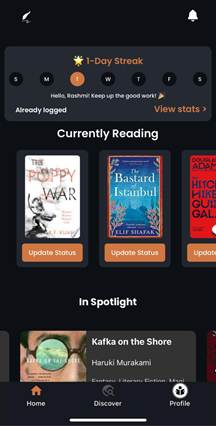
- Click on the “Update Status” option of your desired book.
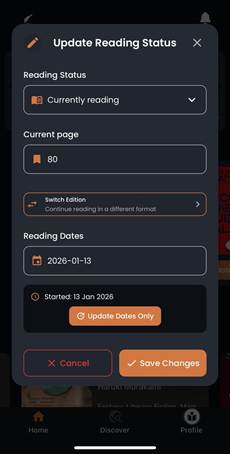
- Go to “Switch Edition” option and select the edition you require.
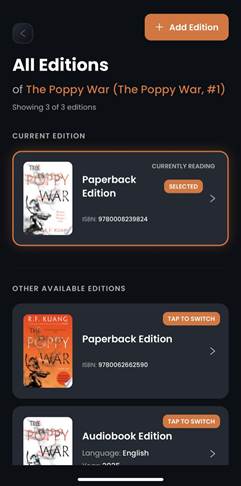
- A dialogue box will pop up showing your current progress and the progress as estimated in your switched edition.
You can update the progress in case the “suggested progress” is not matching with the actuals.
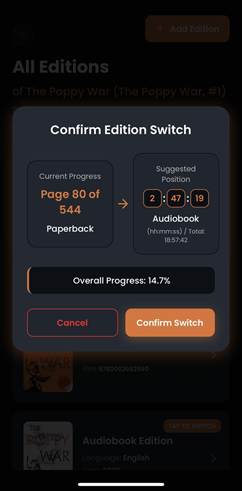
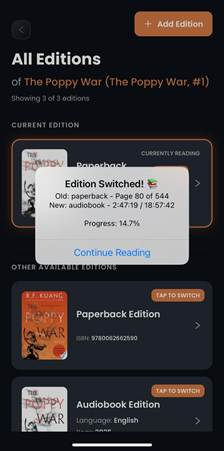
- You can continue reading or listening once you “confirm switch”.
Common Problems This Feature Solves:
Without smart syncing, switching formats usually means:
- Restarting chapters
- Losing immersion
- Repeating content
- Or abandoning one format entirely
Biblophile’s Change Edition feature eliminates these problems completely.
FAQs About Biblophile’s Change Edition Feature:
Q1. Can I switch editions multiple times?
Yes. You can switch formats as often as you like.
Q2. Does this work for long audiobooks?
Absolutely. Progress is calculated proportionally, regardless of length.
Q3. What if editions have different chapter structures?
Biblophile relies on percentage-based tracking, ensuring smooth continuity even when chapters differ.
Q4. Does switching editions affect reading stats?
No. Your reading time and progress remain unified.
Conclusion: Reading Without Limits
Reading today is fluid, and your tracking system should be too.
By allowing seamless transitions between paperback, e-book, and audiobook editions, Biblophile:
- Respects how people actually read
- Saves time and mental effort
- Preserves immersion
- Encourages more consistent reading habits
With Biblophile, you don’t choose one format, you choose the freedom to read your way.
Leave a Reply