
What are tags?
Tags in biblophile are labels that help you categorise and filter books based on theme, mood, genre etc. Basically “playlists” of the books. Traditionally, something like a bookshelf, but more dynamic.
For example, you can tag a single book as ‘mystery’, ‘history’, and/ or ‘fiction’. Whereas in a physical bookshelf, if you place a book in one shelf that’s it.
You can create your own tags to make organisational systems without any limitations.
Benefits of Creating Custom Bookshelves with Tags:
1. Ultimate Personalization for Every Reader
Biblophile’s tagging system puts you in control. You can organize books according to your personal tastes. From ‘comfort reads’ to ‘books that made me cry’. It reflects your identity as a reader and evolves with your changing interests.
2. Simplified Book Organization
Tags eliminate clutter. Instead of scrolling endlessly through hundreds of ‘to be reads’, you can search by mood, author, or topic. It’s the fastest way to turn your digital chaos into a beautifully structured library.
3. Enhanced Book Discovery and Recommendations
By tagging books consistently, Biblophile can offer smarter recommendations. Over time, the platform learns your preferences and helps you discover hidden gems that align perfectly with your reading habits.
4. Streamlined Reading Goals and Tracking
Custom bookshelves help you track progress. Create a ‘2026 Reading Challenge’ tag or ‘TBR (To Be Read)’. You can instantly see how far you’ve come and stay motivated.
5. Effortless Access to Your Favourite Genres and Themes
With a few clicks, you can jump from “Historical Fiction” to “Books Set in Paris” without hunting through your list. It’s an intuitive system that saves time and enhances enjoyment.
How to tag books and create new tags in Biblophile?
- Go to search bar and find the book you want to tag.
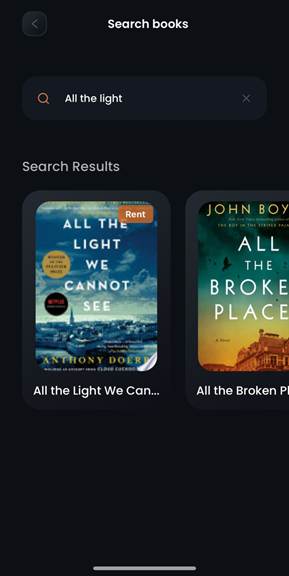
- Click on the “Edit” button next to “My Reading Info”

- Click on “Manage Tags” under the “Tags” label.
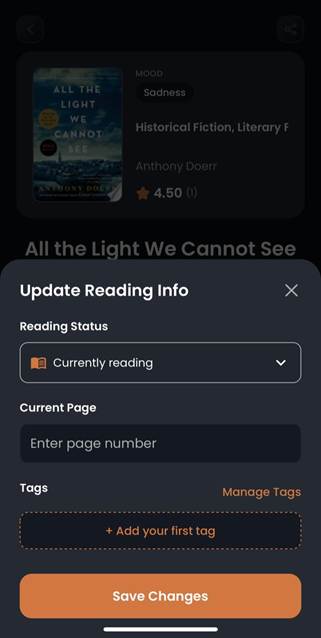
- You can select a pre-defined tag.
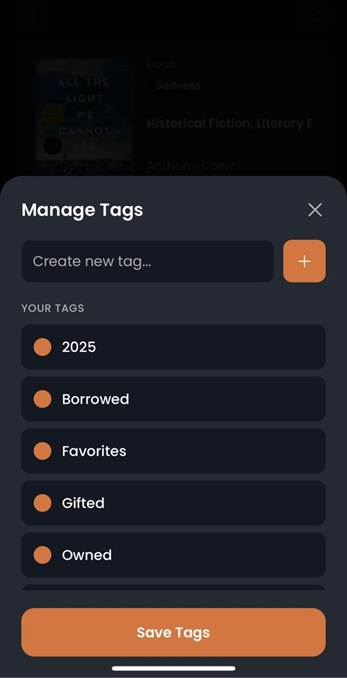
- To create a new tag, type your desired tag name on “Create New Tag…” and click on the “+“symbol next to it.
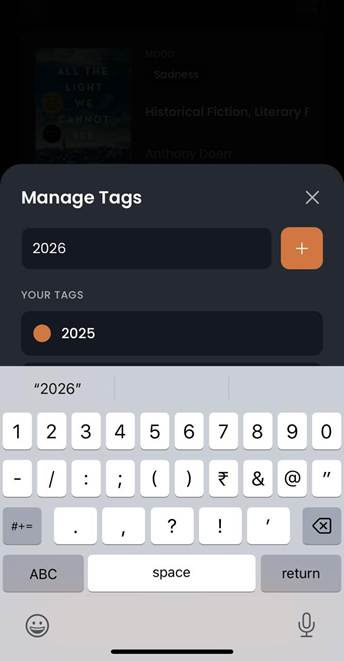
- Select the tags from “Your Tags” option to associate with the selected book.
- To delete a tag, swipe left and confirm on the dialogue box.
- You can find your tagged books in the bookshelf in your profile page.

Creative ways you can use the tags in Biblophile:
- Using Tags to Build Mood-Based Bookshelves
Create shelves like “Rainy Day Reads”, “Books that Heal”, or “No sleep nights” These emotional categories help match your current vibe and energy.
- Tags Reading Challenges
Whether it’s “Winter Reads”, “Pride Month Lit.” or “2026 reads” tags make it easy to group books for short and long term challenges/events.
- Collaborative Bookshelves Using Shared Tags
You can use shared tags, along with your reading buddies to coordinate reading lists, ensuring everyone stays on the same page. Literally!!
FAQs About Biblophile’s Tags and Custom Bookshelves:
Q1. Can I edit or delete tags later?
Yes! Biblophile allows you to easily rename or delete tags anytime to keep your system clean.
Q2. How many tags can I add per book?
There’s no strict limit, but keeping it under 5–6 tags per book ensures usability.
Q3. Are tags private or visible to others?
You can control visibility. Private tags remain for your use, while public tags can support community discovery.
Q4. Can I export or back up my tagged shelves?
Yes, Biblophile offers export features so your organization work is always safe.
Q5. How do tags improve recommendations?
Biblophile’s algorithm learns from your tags to suggest books similar to your interests.
Conclusion:
Transform Your Digital Library with Smart Tagging. It’s flexible, intuitive, and easy to personalize. Tags turn your library into a reflection of you: dynamic and expressive.
Leave a Reply